

How to Replace Kitchenaid Water Filter 2: Step-by-Step Guide
Is your KitchenAid Water Filter 2 not working as well as it used to? Replacing it might seem tricky, but it’s actually simple—and doing it yourself saves time and money.
In this guide, you’ll find easy, step-by-step instructions to swap out your old filter quickly and get fresh, clean water flowing again. Keep reading to make sure your kitchen stays healthy and your water tastes great!
Signs To Replace Your Water Filter
Recognizing when to replace your KitchenAid Water Filter 2 is key to maintaining clean, fresh-tasting water. Ignoring the signs can lead to reduced filter effectiveness and potential health concerns. Here’s how you can tell if it’s time for a new filter.
Reduced Water Flow
If you notice your water pressure dropping or water taking longer to fill a glass, your filter might be clogged. Over time, trapped particles and sediment build up, slowing water flow. This slowdown is a clear sign your filter is struggling and needs replacement to restore normal flow.
Unpleasant Taste Or Odor
Have you experienced a strange taste or smell in your drinking water? A fresh filter removes contaminants that cause off flavors and odors. When your water starts tasting metallic, musty, or just “off,” it’s a strong hint your filter isn’t working well anymore.
Filter Indicator Alerts
Many KitchenAid refrigerators have built-in filter indicator lights or alerts. These signals are designed to remind you exactly when it’s time to change the filter. Don’t ignore these alerts—they help ensure you always enjoy clean, safe water without guesswork.
Gathering Necessary Tools
Before you start replacing your KitchenAid Water Filter 2, make sure you have everything ready. Having the right tools and materials on hand will make the process smoother and faster. It also helps avoid any last-minute trips to the store.
Compatible Replacement Filter
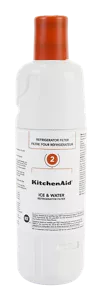
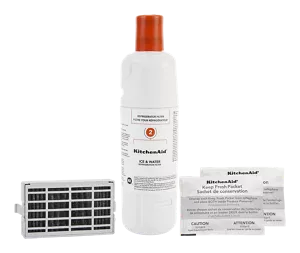
The most important tool is the replacement filter itself. KitchenAid Water Filter 2 has specific models designed for it, so check your fridge’s manual or the filter’s part number.
Buying the wrong filter can lead to leaks or poor water quality. Look for filters labeled specifically for KitchenAid Water Filter 2 or compatible brands that mention your model.
Have you ever tried using a generic filter and ended up with a bad taste or clog? Sticking to the recommended filters saves you from those headaches.
Basic Cleaning Supplies
Replacing your filter is a good chance to clean the water filter housing and surrounding areas. Gather simple cleaning supplies like a soft cloth, mild dish soap, and a small brush.
These items help remove any dirt or buildup that could affect your water’s taste and flow. Avoid harsh chemicals as they might damage the filter or fridge components.
Keeping your filter area clean keeps your water fresh longer and your fridge running well. What cleaning tools do you usually keep handy for small home tasks like this?
Locating The Filter Compartment
Finding the water filter compartment is the first task in replacing the Kitchenaid Water Filter 2. This step ensures a smooth and hassle-free filter change. The filter compartment’s location varies slightly among different Kitchenaid models. Knowing where to look saves time and avoids damage to your appliance.
Common Filter Placement In Kitchenaid Models
Most Kitchenaid refrigerators have the water filter inside the fresh food section. It is usually located near the top right or left corner. Some models place the filter at the base grille, near the kick plate. Others have it inside the refrigerator’s back wall. The filter often looks like a small, white or blue cartridge.
- Top right or left corner inside the fridge
- Base grille near the kick plate
- Back wall inside the fresh food compartment
Check the user manual for your specific model to confirm the exact filter location.
Accessing The Compartment Safely
Before opening the filter compartment, turn off the water supply. This prevents leaks and water spills. Open the fridge door carefully to avoid hitting shelves. Use gentle pressure to remove the cover or cap protecting the filter. Some covers twist off; others slide or snap open.
Wear gloves if you want to protect your hands. Keep a towel nearby to catch any drips. Avoid forcing the filter out. If it resists, check for a release button or latch. Proper access reduces the risk of damage to the filter or fridge parts.
Removing The Old Filter
Removing the old KitchenAid Water Filter 2 is a simple process. It ensures your water stays clean and fresh. Proper removal prevents leaks and damage to your filter system. Take care to follow each step carefully for the best results.
Releasing The Filter Lock
First, locate the filter inside the refrigerator. It usually sits in the upper right corner. Hold the filter gently and turn it counterclockwise. This action releases the lock that holds the filter in place. Pull the filter straight out once it is unlocked. Avoid using force to prevent damage.
Proper Disposal Of Used Filter
The used filter contains trapped impurities and should be discarded properly. Wrap it in a plastic bag to avoid leaks. Check local recycling rules to see if filters can be recycled. If not, dispose of it with regular household waste. Proper disposal helps protect the environment.
Installing The New Filter
Installing the new KitchenAid Water Filter 2 is a simple task. It ensures clean and fresh water from your fridge. Follow clear steps to fit the filter correctly. Proper installation prevents leaks and maintains water quality.
Aligning The Filter Correctly
Start by holding the new filter upright. Locate the arrow or notch on the filter. Match this mark with the slot inside the filter housing. The filter must fit snugly without forcing. Rotate the filter gently until it aligns perfectly.
Securing The Filter In Place
Once aligned, push the filter into the housing. Turn the filter clockwise to lock it securely. You will feel a click or resistance when it locks. Avoid over-tightening to prevent damage. Check that the filter does not move or wobble.

Credit: www.youtube.com
Flushing The New Filter
Flushing the new KitchenAid Water Filter 2 is essential for clean, fresh water. This process removes trapped air and loose carbon particles inside the filter. It ensures your water tastes pure and clear right after installation.
Running Water To Remove Impurities
Start by turning on the cold water faucet. Let the water run through the filter for about 5 minutes. This flushes out any impurities and air bubbles. Use a container to catch the water if you want to avoid waste.
During this time, the water may appear cloudy or have a slight odor. This is normal and will clear up quickly. Keep the water running until it flows clear and smells fresh.
Resetting The Filter Indicator
After flushing, reset the filter indicator on your KitchenAid refrigerator. This helps track when the next filter change is due. Usually, you press and hold the reset button for a few seconds.
Check your refrigerator’s manual for exact reset instructions. A properly reset indicator ensures you maintain good water quality. It also prevents forgetting the next filter replacement date.
Maintenance Tips For Longevity
Keeping your KitchenAid Water Filter 2 in top shape doesn’t end with just replacing it. Proper maintenance plays a big role in making sure your filter lasts longer and keeps your water tasting fresh. Small habits can save you from bigger problems down the road and improve your water quality consistently.
Regular Replacement Schedule
Stick to the recommended replacement timeline for your filter, usually every six months. Waiting too long can cause the filter to clog, reducing water flow and letting impurities slip through. You might think skipping a replacement saves money, but it can lead to costly repairs or even damage to your fridge’s water system.
Mark your calendar or set a reminder on your phone. This simple step helps you stay on track without having to guess when it’s time for a new filter. Have you ever noticed a strange taste in your water and wondered why? It’s often a sign that your filter needs changing.
Cleaning Around The Filter Area
Don’t overlook the space around your filter. Dirt and grime can build up where the filter connects, affecting its seal and performance. Wipe the area gently with a damp cloth every time you replace the filter to keep it clean.
Occasionally, check for any mold or mildew, especially if moisture lingers. Use a mild soap solution if needed, but avoid harsh chemicals that could damage parts. A clean filter area means better water flow and fewer maintenance headaches.
Credit: www.kitchenaid.com
Credit: www.kitchenaid.com
Frequently Asked Questions
How Often Should I Replace The Kitchenaid Water Filter 2?
Replace the Kitchenaid Water Filter 2 every 6 months or after filtering 200 gallons. Timely replacement ensures clean, fresh water and optimal appliance performance.
What Are The Signs To Replace Kitchenaid Water Filter 2?
Signs include reduced water flow, odd taste or odor, and indicator light alerts. These indicate the filter is clogged or expired and needs replacement promptly.
Is It Easy To Replace Kitchenaid Water Filter 2?
Yes, replacing Kitchenaid Water Filter 2 is simple and quick. Twist off the old filter and twist on the new one without tools.
Can I Use Any Water Filter For Kitchenaid Appliances?
No, use only Kitchenaid Water Filter 2 or recommended compatible filters. Using other filters may damage your appliance or reduce water quality.
Conclusion
Replacing the Kitchenaid Water Filter 2 is simple and quick. Follow the steps carefully to avoid any issues. Regular filter changes keep your water clean and fresh. Don’t wait until water tastes off or flow slows down. Taking care of your filter helps your appliance last longer.
Enjoy better water quality every day with little effort. Keep your kitchen healthy and your water safe. You can do this yourself without needing a plumber. Just remember to check the filter every six months. Clean water is important for your family’s health.

Home Improvement Expert & Senior Writer at HomeFixio
Reed Atwood is a seasoned home improvement expert with a passion for transforming everyday living spaces into functional and stylish havens. With years of experience in DIY projects, renovations, and home upgrades, Reed brings a wealth of knowledge to HomeFixio. As a senior writer, he provides readers with practical, easy-to-follow guides, expert tips, and innovative solutions for every room in the house. His goal is to empower homeowners to tackle their projects with confidence, ensuring both quality results and a rewarding experience.


